
Tracer advection
A tracer is a property
If the tracer
Eulerian advection
Numerically we solve
with
Add/delete tracers
For every tracer in SpeedyWeather the tracer advection equation as outlined above is solved. One can add a new tracer to the model before it is initialized to a simulation
using SpeedyWeather
spectral_grid = SpectralGrid(truncation=64, nlayers=1)
model = ShallowWaterModel(spectral_grid)

# add a tracer called :abc
add!(model, Tracer(:abc))
Dict{Symbol, Tracer} with 1 entry:
:abc => Tracer{Bool} <: SpeedyWeather.AbstractTracer…This returns model.tracers, a dictionary, which will always give you an overview of which tracers are defined. Tracers are defined through a key::Symbol for which we use Symbol (not strings, because Symbols are immutable). We just wrap the key here in Tracer to define a tracer. You can add more tracers
add!(model, Tracer(:co2), Tracer(:ch4))Dict{Symbol, Tracer} with 3 entries:
:abc => Tracer{Bool} <: SpeedyWeather.AbstractTracer…
:ch4 => Tracer{Bool} <: SpeedyWeather.AbstractTracer…
:co2 => Tracer{Bool} <: SpeedyWeather.AbstractTracer…or delete them again
delete!(model, Tracer(:co2))
delete!(model, Tracer(:ch4))
Dict{Symbol, Tracer} with 1 entry:
:abc => Tracer{Bool} <: SpeedyWeather.AbstractTracer…Tracers are just defined through their key, e.g. :co2, so while you can do tracer1 = Tracer(:co2) and tracer2 = Tracer(:co2), they will be considered the same tracer – and no two tracers with the same key can exist inside model (and simulation).
What you should not do is add a tracer to the model after it has been initialized, as this would leave it without its required variables that are allocated at initialize!(model). You can check that the tracers exists in the variables with
simulation = initialize!(model)
simulation.variablesVariables{@NamedTuple{...}, ...} (1.21 MB)
├ prognostic (34.45 KB)
│ ├ clock: Clock{DateTime, Second, Float32, Int64, Millisecond}
│ ├ scale: Base.RefValue{Float32}
│ ├ vorticity: 2144×1×2 (LMZT) LowerTriangularArray{ComplexF32, 3, Array{.....
│ ├ divergence: 2144×1×2 (LMZT) LowerTriangularArray{ComplexF32, 3, Array{....
│ ├ η: 2144×2 (LMT) LowerTriangularArray{ComplexF32, 2, Array{...}}
│ └ tracers
│ └ abc: 2144×1×2 (LMZT) LowerTriangularArray{ComplexF32, 3, Array{...}}
├ grid (43.83 KB)
│ ├ vorticity: 10944×1×1, 96-ring (XYZT) OctahedralGaussianField{Float32, 3...
│ ├ u: 10944×1×1, 96-ring (XYZT) OctahedralGaussianField{Float32, 3} as Arr...
│ ├ v: 10944×1×1, 96-ring (XYZT) OctahedralGaussianField{Float32, 3} as Arr...
│ ├ divergence: 10944×1×1, 96-ring (XYZT) OctahedralGaussianField{Float32, ...
│ ├ η: 10944×1, 96-ring (XYT) OctahedralGaussianField{Float32, 2} as Array ...
│ └ tracers
│ └ abc: 10944×1×1, 96-ring (XYZT) OctahedralGaussianField{Float32, 3} as...
├ tendencies (261.30 KB)
│ ├ vorticity: 2144×1×1 (LMZT) LowerTriangularArray{ComplexF32, 3, Array{.....
│ ├ divergence: 2144×1×1 (LMZT) LowerTriangularArray{ComplexF32, 3, Array{....
│ ├ η: 2144×2 (LMT) LowerTriangularArray{ComplexF32, 2, Array{...}}
│ ├ grid
│ │ ├ vorticity: 10944×1×1, 96-ring (XYZT) OctahedralGaussianField{Float32,...
│ │ ├ u: 10944×1×1, 96-ring (XYZT) OctahedralGaussianField{Float32, 3} as A...
│ │ ├ v: 10944×1×1, 96-ring (XYZT) OctahedralGaussianField{Float32, 3} as A...
│ │ ├ divergence: 10944×1×1, 96-ring (XYZT) OctahedralGaussianField{Float32...
│ │ └ η: 10944×1, 96-ring (XYT) OctahedralGaussianField{Float32, 2} as Arra...
│ ├ tracers
│ │ └ abc: 2144×1×1 (LMZT) LowerTriangularArray{ComplexF32, 3, Array{...}}
│ └ grid_tracers
│ └ abc: 10944×1×1, 96-ring (XYZT) OctahedralGaussianField{Float32, 3} as...
├ dynamics (43.82 KB)
│ ├ u_tendency: 2144×1×1 (LMZT) LowerTriangularArray{ComplexF32, 3, Array{....
│ ├ v_tendency: 2144×1×1 (LMZT) LowerTriangularArray{ComplexF32, 3, Array{....
│ ├ geopotential: 10944×1, 96-ring (XYZ) OctahedralGaussianField{Float32, 2...
│ ├ kinetic_energy: 2144×1×1 (LMZT) LowerTriangularArray{ComplexF32, 3, Arr...
│ ├ uh: 2144×1 (LMT) LowerTriangularArray{ComplexF32, 2, Array{...}}
│ ├ vh: 2144×1 (LMT) LowerTriangularArray{ComplexF32, 2, Array{...}}
│ └ grid
│ ├ kinetic_energy: 10944×1×1, 96-ring (XYZT) OctahedralGaussianField{Flo...
│ ├ uh: 10944×1, 96-ring (XYT) OctahedralGaussianField{Float32, 2} as Arr...
│ └ vh: 10944×1, 96-ring (XYT) OctahedralGaussianField{Float32, 2} as Arr...
├ parameterizations (0 bytes)
├ particles (0 bytes)
├ scratch (168.53 KB)
│ ├ a: 2144×1 (LMZ) LowerTriangularArray{ComplexF32, 2, Array{...}}
│ ├ b: 2144×1 (LMZ) LowerTriangularArray{ComplexF32, 2, Array{...}}
│ ├ transform_memory: 105×1×48×2 ScratchMemory{Array{ComplexF32,...}, ...}
│ └ grid
│ ├ a: 10944×1, 96-ring (XYZ) OctahedralGaussianField{Float32, 2} as Arra...
│ └ b: 10944×1, 96-ring (XYZ) OctahedralGaussianField{Float32, 2} as Arra...
└ fused (661.06 KB)
├ spectral_tendencies: 2144×5×1 (LMZT) LowerTriangularArray{ComplexF32, 3...
├ prognostic: 2144×3×2 (LMZT) LowerTriangularArray{ComplexF32, 3, Array{....
├ grid_tendencies: 10944×5×1, 96-ring (XYZT) OctahedralGaussianField{Floa...
├ grid: 10944×3×1, 96-ring (XYZT) OctahedralGaussianField{Float32, 3} as ...
├ uv_dpres_grad_grid: 10944×2×1, 96-ring (XYZT) OctahedralGaussianField{F...
└ uv_dpres_grad_spectral: 2144×2 (LMZ) LowerTriangularArray{ComplexF32, 2...Note that the tracer appear in several arrays, in the prognostic variables, a tendency and so on.
All tracers have to be added to the model before it is initialized to return the simulation. This is because that initialization determines all required variables and allocates them, after that simulation.variables is an immutable collection of (mutable) arrays (see Variables). If you do want to start or pause a tracer advection at any time you have to activate or deactivate them, see below.
(De)activate tracers
While a tracer is defined through its key, e.g.
Tracer(:dust)Tracer{Bool} <: SpeedyWeather.AbstractTracer
├ name::Symbol = dust
└ active::Bool = trueit also has a field active which can be changed any time. Do not confuse this with the discussion of active vs passive, categorising whether a tracer impacts the flow or not. Active versus deactivated here is solely used to describe whether its time evolution is (temporarily) deactivated. An activated tracer (the default) is advected, a deactivated tracer does not change in time (=frozen) but continues to exist and all its variables remain in place. You can (de)activate a tracer with
activate!(model, Tracer(:abc))
deactivate!(model, Tracer(:abc))
which is equivalent to model.tracers[:abc].active = true (default, or false) and also equivalent to (de)activating them in the simulation instead, i.e. activate!(simulation, Tracer(:abc)).
Set tracers
Tracers can be set to values by using the set! function, which can take scalars, fields (spectral or grid) or functions as arguments. But note that tracers are placed in the namespace tracer which you have to pass on as a keyword argument (see Setting variables) e.g.
set!(simulation, abc = 1, namespace = :tracers)

(; GridVariable3D, nlat_half, nlayers) = spectral_grid
set!(simulation, abc=randn(GridVariable3D, nlat_half, nlayers), namespace = :tracers)
set!(simulation, abc=(λ, φ, σ) -> exp(-(λ-180)^2/10^2), namespace = :tracers)
The first one sets abc to a global constant (not super exciting), the second to some random values on a grid (transforms automatically!), and the third sets the tracer to a Gaussian ridge that runs through the Pacific (see Tracer visualisation below).
For more examples how to use set! see Changing orography manually, Manual land-sea mask, and Rossby-Haurwitz wave in a BarotropicModel. But note that because we are setting a (in general) 3D variable here the vertical dimension must align: Hence nlayers for the grid, and the anonymous function must take three arguments, including the vertical coordinate σ even if it's independent of it.
Tracer visualisation
Let us illustrate some tracer advection in practice
using SpeedyWeather
spectral_grid = SpectralGrid(truncation=86, nlayers = 1)
model = ShallowWaterModel(spectral_grid)
add!(model, Tracer(:abc))
simulation = initialize!(model)

# add and set tracer and run a 0-day simulation
set!(simulation, abc = (λ, φ, σ) -> exp(-(λ-180)^2/10^2), namespace =:tracers)
run!(simulation, period = Day(0))

# visualise the initial conditions for this tracer
using CairoMakie
abc0 = get_step(simulation.variables.grid.tracers.abc)[:, 1]

heatmap(abc0, title="Tracer abc, initial conditions")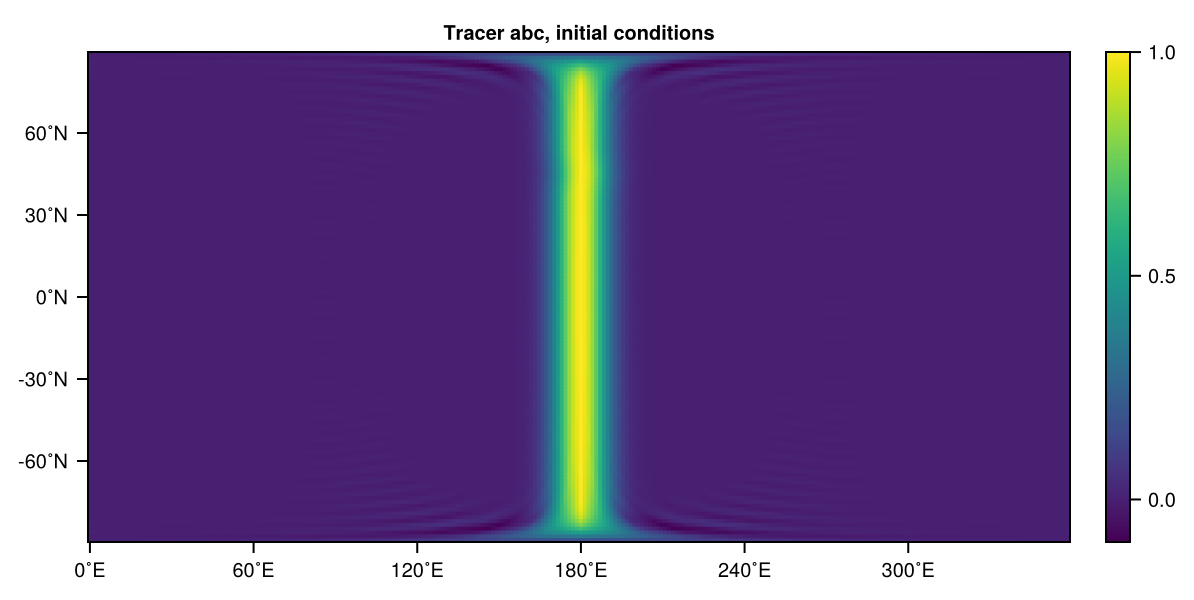
So we started with a north-south stripe of some tracer. [:, 1] is used to pull out all values : on the one and only layer 1, see Step dimension The ShallowWaterModel has by default a jet in the northern hemisphere which will advect that tracer, after some days:
run!(simulation, period=Day(3))

abc1 = get_step(simulation.variables.grid.tracers.abc)[:, 1]
heatmap(abc1, title="Tracer abc, after 3 days")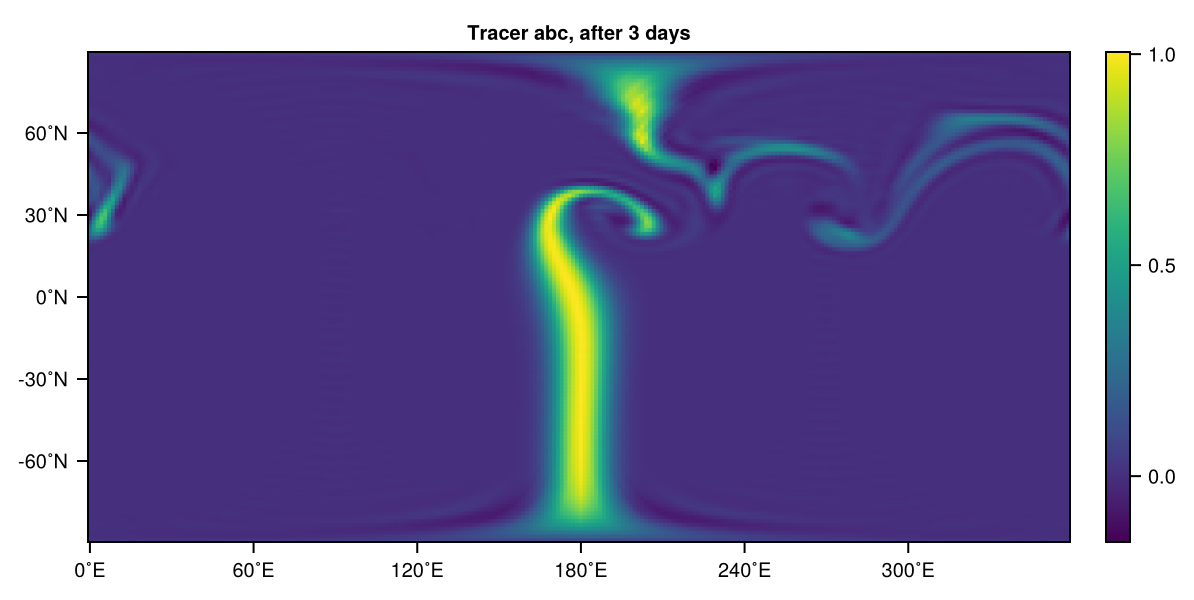
Output tracers
This follows equivalent to other Output variables but the tracer name as Symbol has to be provided
add!(model, SpeedyWeather.TracerOutput(:abc))NetCDFOutput{Field{Float32, 1, Vector{Floa...}
├ status: inactive/uninitialized
├ write restart file = true (if active)
├ interpolator::AnvilInterpolator{Float32, GridGeometry{OctahedralGaussianGrid{C...}
├ layers::ModelLayers
├ path = output.nc (overwrite=false)
├ interval = 21600 seconds
└ variables
├ abc: abc [?]
├ eta: interface displacement [m]
├ v: meridional wind [m/s]
├ u: zonal wind [m/s]
└ vor: relative vorticity [s^-1]and other keyword arguments like long_name::String and units::String can be passed on too.